Guides
The App That Takes a Picture of Whoever Snoops on Your Phone
Mehmet Ali Kısacık · Developer of Secure Folder · July 8, 2026 · 2 min read
Updated September 29, 2026
An app that takes a picture when the password is incorrect can photograph someone entering the wrong PIN on the app's own lock screen, and Secure Folder: Privacy Vault does this with Break-in Alerts.
Hide private photos in a PIN-protected vault.
Set the wrong-PIN threshold, then see the photo and attempt details in Intruder Logs.
In this article
Which wrong PIN attempts can be photographed
Break-in Alerts starts counting when someone reaches the vault's own PIN screen and enters an incorrect PIN.
This is useful when someone has access to an unlocked iPhone and then tries to open your private vault. Counting starts at the vault PIN screen: a wrong PIN there counts toward a capture.
What the Intruder Log records
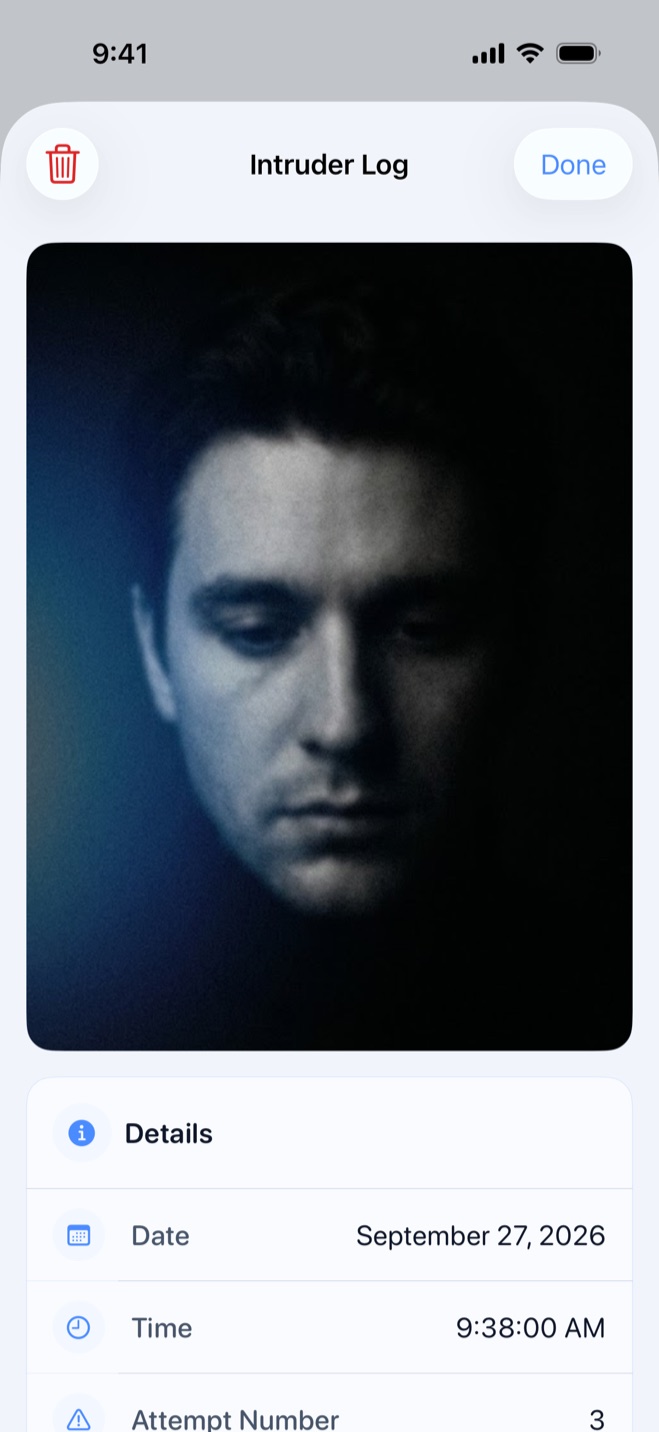
Once the wrong-PIN count reaches your chosen threshold, the front camera takes a photo with no flash. That attempt and each later wrong PIN before the next successful unlock can create another capture, and a successful unlock resets the count.
Each Intruder Log entry keeps
- A front-camera photo of whoever is in front of the phone.
- The date and time of the attempt.
- The wrong-PIN attempt number.
Together, those details show when the attempts happened and whether there was one capture or a run of repeated guesses. The entries stay inside the vault, so you can review the record after you unlock it.
How to turn on wrong-PIN capture
- 1.
Use Premium
Break-in Alerts require Premium, the optional paid upgrade.
- 2.
Turn on Break-in Alerts
Open the vault, go to the Security tab, tap Break-in Alerts and switch the feature on.
- 3.
Allow camera access
Allow camera access when iOS asks. Apple requires apps to request permission before using the camera, and you can review that access later in Settings > Privacy & Security > Camera.1
- 4.
Choose the threshold
The default starts capture on the third wrong PIN in a row, and you can choose a threshold from the first through the tenth attempt.
Sources
- 1.Apple, “Control access to hardware features on iPhone,” support.apple.com